Disclosure: As an Amazon Associate, we earn from qualifying purchases. This article may contain affiliate links. If you buy through our links, we may earn a commission at no extra cost to you.
A3 DTF Printer Review: 13-Inch Direct to Film Transfer Printer for T-Shirt Printing
If you want to start or upgrade a custom T-shirt printing business, a DTF printer can become one of the most important machines in your workflow. The A3 DTF Printer, 13-inch Direct to Film Transfer Printer with XP600 Print Head and White Ink Circulation is designed for DIY creators, small apparel shops, Etsy sellers, and business users who want to print colorful designs and transfer them onto shirts and other fabric products.
This printer is especially useful when paired with a heat press machine because the DTF workflow requires printing the design on film, applying powder, curing the transfer, and then pressing the design onto fabric.
Check Latest Price on Amazon:
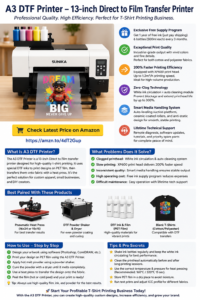
What Is This A3 DTF Printer?
This A3 DTF printer is a 13-inch direct-to-film transfer printer designed to print designs onto PET film. After printing, the design is coated with hot melt adhesive powder, cured, and then transferred to fabric using a heat press.
Unlike traditional vinyl cutting, DTF printing can handle colorful, detailed, multi-color artwork without cutting and weeding each layer. This makes it useful for custom T-shirts, hoodies, tote bags, team shirts, business uniforms, and personalized apparel.
Main Functions
1. XP600 Print Head
The XP600 print head is designed to support detailed color output and faster production. For users who want to print more than simple one-color designs, this is important because DTF printing depends on accurate color, smooth ink flow, and stable print quality.
2. White Ink Circulation
White ink is essential in DTF printing because it creates the base layer that helps colors appear clearly on dark and colored fabrics. However, white ink can settle or clog if not managed properly.
The white ink circulation system helps keep the ink moving, which can reduce clogging problems and improve printing stability.
3. Semi-Automatic Cleaning Module
Printer maintenance is one of the biggest concerns for DTF users. A semi-automatic cleaning module can help reduce maintenance difficulty and support smoother operation, especially for users who print frequently.
4. A3 / 13-Inch Printing Width
The 13-inch format is suitable for many T-shirt designs and small business projects. It gives users more printing space than very small desktop systems while still being manageable for a home studio or small workshop.
5. Smart Media Handling
The printer is designed to feed film smoothly and reduce media handling problems. Stable film feeding is important because wrinkles, slipping, or poor alignment can damage the print and waste film, ink, and powder.
What Problems Does This Product Solve?
This A3 DTF printer helps solve several problems for T-shirt and apparel creators.
- Too much manual work with vinyl: DTF can print complex designs without cutting and weeding multiple vinyl layers.
- Difficulty printing colorful artwork: DTF is better for detailed, multi-color images than basic HTV cutting.
- Limited fabric options: DTF transfers can work on cotton, polyester, blends, and many apparel materials.
- Slow small-batch customization: Small shops can print custom transfers without ordering large quantities from outside suppliers.
- High outsourcing costs: Owning a DTF printer can reduce dependence on third-party transfer suppliers.
- White ink clogging concerns: White ink circulation and cleaning functions can help reduce maintenance issues.
Best Products to Pair With This A3 DTF Printer
This printer works best as part of a complete production system. The most useful companion products include:
- 16×24 Pneumatic Dual Platen Heat Press Machine — for pressing larger transfers and batch production.
- 15×15 or 16×20 Heat Press Machine — for smaller T-shirt and hoodie projects.
- DTF Powder Shaker and Dryer — for applying and curing adhesive powder more efficiently.
- DTF PET Film — required for printing the transfer design.
- DTF Ink Set — CMYK plus white ink for DTF printing.
- Hot Melt Adhesive Powder — needed to bond the design to fabric.
- Blank T-Shirts and Hoodies — cotton, polyester, and blended apparel.
- Heat-Resistant Tape — useful for keeping transfers aligned.
- Teflon Sheets or Finishing Sheets — useful during pressing and finishing.
How to Use This A3 DTF Printer
The basic DTF workflow usually includes these steps:
- Create or prepare your artwork in design software.
- Print the design onto DTF PET film using the printer.
- Apply hot melt adhesive powder evenly over the wet ink.
- Cure the powder using a dryer, curing oven, or compatible curing setup.
- Place the transfer on the garment.
- Use a heat press to transfer the design to the fabric.
- Peel the film according to the transfer instructions.
- Do a final press if required for better durability and finish.
Tips and Tricks for Better Results
- Shake white ink bottles regularly before use.
- Keep the white ink circulation system active according to the manufacturer’s instructions.
- Use high-quality DTF film, ink, and powder.
- Store film and powder in a dry place to avoid moisture problems.
- Run test prints before customer orders.
- Use the correct ICC profile for better color output.
- Keep the print head clean and follow the maintenance schedule.
- Use the correct heat press temperature, time, and pressure for your transfer.
- Pre-press garments to remove moisture and wrinkles.
- Keep a production notebook with successful settings for each fabric type.
Why It Works Well With a Heat Press
A DTF printer creates the transfer, but the heat press completes the product. Without a heat press, the printed design cannot be properly bonded to the garment.
For small jobs, a standard 15×15 heat press may be enough. For larger designs and higher production volume, a 16×24 pneumatic dual platen heat press can improve speed, pressure consistency, and workflow efficiency.
This makes the A3 DTF printer a strong companion product for heat press users who want to expand from simple HTV designs into full-color custom apparel printing.
Who Should Consider This Printer?
This A3 DTF printer may be a good fit for:
- T-shirt business beginners
- Etsy sellers
- Custom apparel shops
- Home-based printing businesses
- DTF transfer sellers
- School and team shirt makers
- Event merchandise creators
- Small businesses that want in-house printing
Final Recommendation
The A3 DTF Printer, 13-inch Direct to Film Transfer Printer with XP600 Print Head and White Ink Circulation is a practical option for users who want to produce colorful custom transfers for T-shirts and apparel products.
Its main value is that it helps users move beyond simple vinyl cutting and into full-color, small-batch custom apparel production. When paired with a reliable heat press, DTF film, DTF ink, hot melt powder, and blank garments, it can become the center of a profitable T-shirt printing workflow.
Check Latest Price on Amazon:
Frequently Asked Questions
What is a DTF printer used for?
A DTF printer is used to print designs onto transfer film. The design is then applied to fabric with adhesive powder and a heat press.
Can this printer be used for T-shirts?
Yes. This type of A3 DTF printer is commonly used for custom T-shirts, hoodies, tote bags, and other apparel products.
Does this printer need a heat press?
Yes. A heat press is needed to transfer the printed DTF design from film onto fabric.
What products should be paired with this printer?
Useful companion products include a heat press machine, DTF PET film, DTF ink, hot melt adhesive powder, blank shirts, finishing sheets, and heat-resistant tape.
Is this printer good for small business?
Yes, it can be useful for small businesses that want to produce custom shirts and apparel without outsourcing every transfer order.