<p><strong>Disclosure:</strong> As an Amazon Associate, we earn from qualifying purchases. This article may contain affiliate links. If you buy through our links, we may earn a commission at no extra cost to you.</p>
<h1>Siser Juliet High-Definition Cutter Review: A Professional Vinyl Cutting Machine for HTV, Stickers, Paper, and Heat Press Projects</h1>
<p>If you want to create custom T-shirts, decals, stickers, paper crafts, signs, labels, or small business vinyl products, a good cutting machine can become one of the most important tools in your production workflow. The <strong>Siser Juliet High-Definition Cutter</strong> is a 12-inch professional cutting machine designed for creators who need precision, speed, quiet operation, and reliable material handling.</p>
<p>For heat press users, this cutter is especially valuable because it works well with <strong>Siser HTV</strong>, <strong>EasyPSV</strong>, vinyl, cardstock, stickers, and other craft materials. It can help you cut names, numbers, logos, custom shirt graphics, decals, labels, and personalized designs for both hobby and business use.</p>
<p><strong>Check Latest Price on Amazon:</strong></p>
<p>
<a href=”https://amzn.to/4fiCueW” target=”_blank” rel=”sponsored nofollow” style=”display:inline-block; background:#ff9900; color:#111; padding:12px 22px; border-radius:6px; font-weight:bold; text-decoration:none;”>
Check Latest Price on Amazon
</a>
</p>
<h2>What Is the Siser Juliet High-Definition Cutter?</h2>
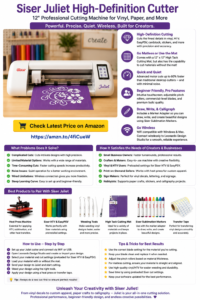
<p>The Siser Juliet is a 12-inch high-definition cutting machine designed for vinyl, heat transfer vinyl, paper, cardstock, stickers, and other creative materials. It is built for both beginners and professional users who want clean, accurate cuts and a smoother production process.</p>
<p>Juliet is especially useful for people who make:</p>
<ul>
<li>Custom T-shirts</li>
<li>HTV shirt designs</li>
<li>Names and numbers for uniforms</li>
<li>Vinyl decals</li>
<li>Stickers</li>
<li>Labels</li>
<li>Paper crafts</li>
<li>Signage</li>
<li>Personalized gifts</li>
<li>Small business products</li>
</ul>
<p>When paired with a heat press machine, Siser Juliet can help you create a complete custom apparel workflow: design, cut, weed, transfer, heat press, and finish.</p>
<h2>Main Functions of the Siser Juliet Cutter</h2>
<h3>1. High-Definition Cutting</h3>
<p>The main advantage of the Siser Juliet is precision. It is designed to cut fine details in vinyl, HTV, EasyPSV, cardstock, stickers, and other materials. This matters when you are cutting small letters, detailed logos, thin lines, decorative patterns, or professional-looking decals.</p>
<p>For producers, better cutting accuracy means less wasted material, cleaner designs, and fewer failed products.</p>
<h3>2. Preinstalled Settings for Siser Materials</h3>
<p>Juliet is designed for Siser HTV and EasyPSV, with preinstalled cut settings that make setup easier. This is helpful for beginners because choosing the wrong blade depth, pressure, or speed can damage materials or cause incomplete cuts.</p>
<p>For business users, preinstalled settings can save time and make repeated production more consistent.</p>
<h3>3. Matless Cutting Option</h3>
<p>Juliet includes a 12×12 high-tack cutting mat, but it can also cut some materials without a mat. Matless cutting is useful when working with rolled vinyl or longer pieces of material.</p>
<p>This can help producers save time, use more of the cutting area, and reduce the need to load and unload mats constantly.</p>
<h3>4. Fast and Quiet Operation</h3>
<p>The advanced motor allows Juliet to cut faster than many traditional desktop cutters while operating more quietly. For home studios, small shops, and craft rooms, quieter operation is a real advantage.</p>
<p>If you cut many designs each day, faster and quieter operation can improve productivity and make the workspace more comfortable.</p>
<h3>5. Beginner-Friendly Touchscreen Interface</h3>
<p>Juliet includes an intuitive touchscreen user interface, making it easier for new users to set up and operate the machine. This reduces the learning curve for people who are new to vinyl cutting.</p>
<h3>6. Professional Features for Production Users</h3>
<p>Although Juliet is beginner-friendly, it also includes features useful for more serious creators, including adjustable pinch rollers, commercial-level blades, and a premium build quality.</p>
<p>These features matter when users want better control, more reliable feeding, and cleaner results across different materials.</p>
<h3>7. Draw, Write, and Calligraphy Functions</h3>
<p>With the included marker adapter, Juliet can also draw and write. When used with compatible markers, it can create clean lines, writing projects, calligraphy-style designs, cards, labels, and creative paper crafts.</p>
<h3>8. WiFi Compatibility With Windows and Mac</h3>
<p>Juliet can connect wirelessly to Leonardo Design Studio software. This helps reduce cable clutter and gives users more flexibility in where they place the cutter in the workspace.</p>
<h2>What Problems Does This Product Solve?</h2>
<h3>Problem 1: Difficult Detailed Cutting</h3>
<p>Many low-quality cutters struggle with small letters, thin lines, and detailed artwork. Juliet is designed for high-definition cutting, helping users produce cleaner and more professional designs.</p>
<h3>Problem 2: Slow Production Workflow</h3>
<p>When cutting speed is slow, production time increases. Juliet’s faster cutting performance can help small businesses finish more orders in less time.</p>
<h3>Problem 3: Loud Cutting Noise</h3>
<p>Traditional desktop cutters can be noisy. A quieter cutter is better for home-based creators, shared workspaces, and small studios.</p>
<h3>Problem 4: Material Loading Limitations</h3>
<p>Some cutters require a mat for most jobs. Juliet’s matless cutting capability can make vinyl production faster and more flexible.</p>
<h3>Problem 5: Beginner Setup Confusion</h3>
<p>New users often struggle with blade settings, software, and material selection. Juliet’s touchscreen interface and preinstalled Siser material settings make the learning process easier.</p>
<h3>Problem 6: Inconsistent Results for Small Business Orders</h3>
<p>For producers, consistency is essential. A more precise cutter helps reduce bad cuts, wasted vinyl, and customer complaints.</p>
<h2>How Siser Juliet Meets the Needs of Producers</h2>
<p>For producers and small business owners, a cutting machine is not just a craft tool. It is part of the production system. The Siser Juliet can help meet several business needs:</p>
<ul>
<li><strong>Faster turnaround:</strong> Faster cutting helps complete orders more quickly.</li>
<li><strong>Cleaner output:</strong> High-definition cutting improves product quality.</li>
<li><strong>Lower waste:</strong> Better accuracy can reduce failed cuts and wasted vinyl.</li>
<li><strong>More product options:</strong> Users can create shirts, decals, stickers, labels, and paper goods.</li>
<li><strong>Better workflow:</strong> WiFi connection and matless cutting can make production smoother.</li>
<li><strong>Professional appearance:</strong> Clean cuts help finished products look more polished.</li>
</ul>
<p>For heat press businesses, Juliet is especially useful for adding names, numbers, logos, team designs, and custom lettering to apparel.</p>
<h2>Best Products to Pair With the Siser Juliet Cutter</h2>
<p>The Siser Juliet works best when paired with the right supplies and production tools. Here are the most useful companion products:</p>
<h3>1. Heat Press Machine</h3>
<p>A heat press is essential if you want to apply HTV designs to shirts, hoodies, bags, hats, or other fabric products. Juliet cuts the vinyl; the heat press applies the design.</p>
<p>Related guide: <a href=”https://heatpressreviews.com/16×24-pneumatic-dual-platen-heat-press-a-comprehensive-review/”>16×24 Pneumatic Dual Platen Heat Press Review</a></p>
<h3>2. Siser HTV</h3>
<p>Siser HTV is one of the most natural companion materials for Juliet. It is useful for T-shirts, hoodies, tote bags, uniforms, names, numbers, and custom apparel.</p>
<h3>3. Siser EasyPSV</h3>
<p>EasyPSV is useful for adhesive vinyl decals, labels, signs, cups, bottles, windows, and craft projects.</p>
<h3>4. Weeding Tools</h3>
<p>After cutting HTV or vinyl, you need to remove the excess material. Good weeding tools make this process faster and cleaner, especially for small details.</p>
<h3>5. Transfer Tape</h3>
<p>Transfer tape helps move adhesive vinyl designs from the backing sheet to the final surface. It is important for decals, labels, signs, and sticker-style projects.</p>
<h3>6. Cutting Mat</h3>
<p>Juliet includes a high-tack cutting mat, but extra mats can be useful when producing multiple projects or working with different materials.</p>
<h3>7. Blank T-Shirts and Hoodies</h3>
<p>For heat press users, blank apparel is essential. Keep common sizes and colors available if you sell custom shirts.</p>
<h3>8. Siser Sublimation Markers</h3>
<p>With the included marker adapter, Juliet can be used for drawing and writing projects with compatible markers. This adds more creative possibilities beyond cutting.</p>
<h2>How to Use the Siser Juliet Cutter</h2>
<p>A simple beginner workflow looks like this:</p>
<ol>
<li>Install and open Leonardo Design Studio software.</li>
<li>Create or import your design.</li>
<li>Select your material type and cut settings.</li>
<li>Load your material with or without the cutting mat.</li>
<li>Send the design to Juliet.</li>
<li>Cut the design.</li>
<li>Weed away the excess vinyl or HTV.</li>
<li>Use transfer tape for adhesive vinyl or prepare HTV for pressing.</li>
<li>Apply the design with a heat press if using HTV.</li>
<li>Inspect the final product for clean edges and proper adhesion.</li>
</ol>
<h2>Tips and Tricks for Better Cutting Results</h2>
<ul>
<li>Always perform a test cut before using a new material.</li>
<li>Use the correct blade setting for the material thickness.</li>
<li>Keep your blade clean and replace it when cuts become rough.</li>
<li>Use preinstalled Siser cut settings when working with Siser HTV or EasyPSV.</li>
<li>Make sure vinyl is straight before matless cutting.</li>
<li>Adjust pinch rollers properly for the material width.</li>
<li>Use high-quality HTV and adhesive vinyl for cleaner cuts.</li>
<li>Weed slowly when working with small letters or detailed designs.</li>
<li>Keep the cutting mat clean so material stays flat.</li>
<li>Update Leonardo Design Studio when updates are available.</li>
<li>For HTV projects, remember to mirror the design before cutting.</li>
<li>Store vinyl rolls flat or upright to avoid wrinkles and curling.</li>
</ul>
<h2>Why It Works Well With Heat Press Projects</h2>
<p>The Siser Juliet cutter and a heat press machine work together naturally. Juliet cuts the design, and the heat press applies the design to the final product.</p>
<p>This combination is especially useful for:</p>
<ul>
<li>Custom T-shirts</li>
<li>Team uniforms</li>
<li>Names and numbers</li>
<li>School shirts</li>
<li>Event shirts</li>
<li>Hoodies</li>
<li>Tote bags</li>
<li>Small business apparel</li>
</ul>
<p>If you already own a heat press, adding a high-definition cutter like Juliet can help expand your product range and increase customization options.</p>
<h2>Who Should Consider the Siser Juliet?</h2>
<p>The Siser Juliet may be a good choice for:</p>
<ul>
<li>Heat press business owners</li>
<li>HTV users</li>
<li>Vinyl decal sellers</li>
<li>Sticker makers</li>
<li>Craft business owners</li>
<li>Etsy sellers</li>
<li>School and team apparel makers</li>
<li>DIY creators</li>
<li>Small production studios</li>
<li>Beginners who want a machine they can grow into</li>
</ul>
<p>It may not be necessary if you only make very occasional crafts and do not need detailed cutting or production-level consistency. But for serious creators and small businesses, Juliet offers strong long-term value.</p>
<h2>Final Recommendation</h2>
<p>The <strong>Siser Juliet High-Definition Cutter</strong> is a powerful and flexible cutting machine for users who want professional-quality vinyl, HTV, sticker, paper, and craft cutting. Its high-definition cutting, matless capability, quiet operation, touchscreen interface, wireless connection, and Leonardo Design Studio software make it useful for both beginners and production-focused users.</p>
<p>For heat press users, Juliet is especially valuable because it helps create custom HTV designs, names, numbers, logos, and apparel graphics. When paired with a heat press machine, Siser HTV, weeding tools, transfer tape, and blank apparel, it can become an important part of a profitable custom product workflow.</p>
<p><strong>Check Latest Price on Amazon:</strong></p>
<p>
<a href=”https://amzn.to/4fiCueW” target=”_blank” rel=”sponsored nofollow” style=”display:inline-block; background:#ff9900; color:#111; padding:12px 22px; border-radius:6px; font-weight:bold; text-decoration:none;”>
Buy on Amazon
</a>
</p>
<h2>Frequently Asked Questions</h2>
<h3>What is the Siser Juliet used for?</h3>
<p>It is used for cutting vinyl, HTV, adhesive vinyl, stickers, cardstock, paper crafts, decals, and other creative materials.</p>
<h3>Can Siser Juliet cut HTV for T-shirts?</h3>
<p>Yes. Juliet is designed for Siser HTV and can cut heat transfer vinyl for T-shirts, hoodies, tote bags, and other fabric projects.</p>
<h3>Does it work with a heat press?</h3>
<p>Yes. Juliet cuts HTV designs, and a heat press applies those designs to garments or fabric products.</p>
<h3>Can it cut without a mat?</h3>
<p>Yes. Juliet has matless cutting capability for compatible materials, which can make vinyl production faster and more flexible.</p>
<h3>Is it good for beginners?</h3>
<p>Yes. It has an intuitive touchscreen interface and preinstalled cut settings for Siser materials, making it easier for beginners to get started.</p>
<h3>What should I pair with this cutter?</h3>
<p>Useful companion products include a heat press machine, Siser HTV, Siser EasyPSV, weeding tools, transfer tape, cutting mats, blank shirts, and compatible markers.</p>