<p><strong>Disclosure:</strong> As an Amazon Associate, we earn from qualifying purchases. This article may contain affiliate links. If you buy through our links, we may earn a commission at no extra cost to you.</p>
<h1>Brother Sublimation Printer SP1 Review: A Beginner-Friendly Sublimation Printer for DIY Projects and Small Businesses</h1>
<p>If you want to create custom T-shirts, mugs, bags, hats, home décor items, and personalized gifts, a sublimation printer can become one of the most useful tools in your creative workspace. The <strong>Brother Sublimation Printer SP1</strong> is designed for DIY creators, crafters, small business owners, and beginners who want a simpler way to start sublimation printing.</p>
<p>This printer works with the <strong>Brother Artspira app</strong>, which helps users create, import, save, and print designs more easily. For people who are new to sublimation, this app-based workflow can make the process less confusing than using complicated professional design software from the beginning.</p>
<p><strong>Check Latest Price on Amazon:</strong></p>
<p>
<a href=”https://amzn.to/4an57UT” target=”_blank” rel=”sponsored nofollow” style=”display:inline-block; background:#ff9900; color:#111; padding:12px 22px; border-radius:6px; font-weight:bold; text-decoration:none;”>
Check Latest Price on Amazon
</a>
</p>
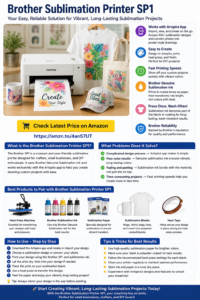
<h2>What Is the Brother Sublimation Printer SP1?</h2>
<p>The Brother Sublimation Printer SP1 is a sublimation printer designed for custom creative projects. Sublimation printing uses special sublimation ink and paper. After printing the design, you use heat and pressure from a heat press to transfer the image onto compatible items.</p>
<p>Unlike regular inkjet printing, sublimation ink is activated by heat. The printed colors may look muted on paper, but once heat pressed onto a polyester-coated item or polyester fabric, the design becomes bright, rich, and long-lasting.</p>
<p>This makes the Brother SP1 useful for people who want to create personalized products such as:</p>
<ul>
<li>Custom T-shirts</li>
<li>Sublimation mugs</li>
<li>Polyester tote bags</li>
<li>Hats and caps</li>
<li>Personalized gifts</li>
<li>Photo panels</li>
<li>Coasters</li>
<li>Small business merchandise</li>
<li>DIY craft projects</li>
</ul>
<h2>Main Functions of the Brother Sublimation Printer</h2>
<h3>1. Works With the Artspira App</h3>
<p>One of the biggest advantages of this printer is its connection with the <strong>Artspira app</strong>. Users can import images, save printing designs, access ready-made sublimation patterns, and create projects from a mobile device.</p>
<p>For beginners, this is helpful because it reduces the difficulty of starting with sublimation. Instead of building every design from scratch, users can explore available patterns, images, and creative tools inside the app.</p>
<h3>2. Easy Design-to-Print Workflow</h3>
<p>The basic workflow is simple:</p>
<ol>
<li>Create or import a design in Artspira.</li>
<li>Print the design with the Brother Sublimation Printer.</li>
<li>Place the printed transfer on a compatible blank.</li>
<li>Use a heat press to transfer the design.</li>
<li>Remove the paper and finish the project.</li>
</ol>
<p>This makes the printer suitable for people who want to create projects without immediately learning complex production software.</p>
<h3>3. Brother Genuine Sublimation Ink</h3>
<p>The printer uses Brother Genuine Sublimation Ink, which is designed for vibrant, long-lasting results. Sublimation ink does not simply sit on top of the material. With heat and pressure, it bonds into the polyester coating or polyester fibers.</p>
<p>This is why sublimation designs can stay bright through repeated washing and regular use when applied correctly.</p>
<h3>4. Fast Printing Speeds</h3>
<p>Fast printing speed is helpful for users who want to make multiple projects quickly. Whether you are preparing gifts, small business orders, or product samples, faster printing can improve workflow efficiency.</p>
<h3>5. Designed for Long-Lasting Projects</h3>
<p>Sublimation is different from traditional iron-on vinyl. With the right blank and heat press settings, the design becomes part of the coated surface or polyester fabric. This can create a smoother feel and better durability compared with some surface-applied transfers.</p>
<h2>What Problems Does This Printer Solve?</h2>
<h3>Problem 1: Sublimation Feels Too Complicated for Beginners</h3>
<p>Many beginners feel overwhelmed by sublimation because it involves design software, special ink, transfer paper, heat settings, and compatible blanks. The Brother SP1 helps simplify the process with the Artspira app and a more guided creative workflow.</p>
<h3>Problem 2: DIY Projects Look Too Plain</h3>
<p>If you want to make clothes, mugs, bags, or gifts more personal, sublimation gives you more creative freedom. You can add photos, artwork, names, patterns, and colorful designs to compatible products.</p>
<h3>Problem 3: Vinyl Transfers Can Peel or Feel Heavy</h3>
<p>Traditional vinyl designs sit on top of the fabric. Sublimation designs bond into compatible polyester materials, which can create a softer feel and reduce peeling problems when the project is made correctly.</p>
<h3>Problem 4: Small Businesses Need Custom Product Options</h3>
<p>For Etsy sellers, craft fair sellers, and small businesses, sublimation can open more product categories. Instead of selling only shirts, you can create mugs, bags, coasters, hats, photo panels, and seasonal gifts.</p>
<h3>Problem 5: Outsourcing Custom Products Can Be Expensive</h3>
<p>If you regularly order personalized sublimation products from outside suppliers, owning a sublimation printer may help reduce outsourcing and give you more control over design, testing, and production timing.</p>
<h2>Best Products to Pair With the Brother Sublimation Printer</h2>
<p>The Brother Sublimation Printer works best as part of a complete sublimation setup. The printer alone is not enough. You also need compatible supplies and a heat press.</p>
<h3>1. Heat Press Machine</h3>
<p>A heat press is required to transfer sublimation prints. For shirts and flat items, a 15×15 or 16×20 heat press is usually practical. For larger production, a 16×24 pneumatic heat press can support bigger designs and batch work.</p>
<p>Related guide: <a href=”https://heatpressreviews.com/16×24-pneumatic-dual-platen-heat-press-a-comprehensive-review/”>16×24 Pneumatic Dual Platen Heat Press Review</a></p>
<h3>2. Sublimation Paper</h3>
<p>Sublimation paper is designed to hold and release sublimation ink during heat transfer. Regular copy paper is not recommended for sublimation projects.</p>
<h3>3. Brother Genuine Sublimation Ink</h3>
<p>Using the correct sublimation ink is important for color quality, printer performance, and project durability.</p>
<h3>4. Polyester or Polyester-Coated Blanks</h3>
<p>Sublimation works best on polyester fabrics and coated blanks. Good starter blanks include:</p>
<ul>
<li>Polyester T-shirts</li>
<li>Sublimation mugs</li>
<li>Coated tote bags</li>
<li>Coasters</li>
<li>Photo panels</li>
<li>Mouse pads</li>
<li>Hats</li>
<li>Keychains</li>
</ul>
<h3>5. Heat-Resistant Tape</h3>
<p>Heat tape helps keep the transfer paper in place during pressing. This is especially useful for mugs, coasters, metal panels, and small blanks.</p>
<h3>6. Protective Paper or Blowout Paper</h3>
<p>Protective paper helps prevent ink from transferring to your heat press, mat, or other surfaces. This is important because sublimation ink can migrate during pressing.</p>
<h2>How to Use the Brother Sublimation Printer</h2>
<p>Here is a simple beginner workflow:</p>
<ol>
<li>Download the Brother Artspira app.</li>
<li>Create or import your design.</li>
<li>Mirror the design if required for your project.</li>
<li>Print the design using sublimation paper and sublimation ink.</li>
<li>Let the print dry if needed.</li>
<li>Place the design face down on the sublimation blank.</li>
<li>Secure the paper with heat-resistant tape.</li>
<li>Use the correct heat press temperature, time, and pressure.</li>
<li>Remove the paper carefully after pressing.</li>
<li>Allow the item to cool and inspect the final result.</li>
</ol>
<h2>Tips and Tricks for Better Sublimation Results</h2>
<ul>
<li>Always use sublimation-compatible blanks.</li>
<li>Choose polyester fabric or polyester-coated products.</li>
<li>Use high-quality sublimation paper.</li>
<li>Use Brother Genuine Sublimation Ink for best compatibility.</li>
<li>Mirror your design before printing when required.</li>
<li>Pre-press fabric items to remove moisture and wrinkles.</li>
<li>Use heat-resistant tape to prevent ghosting.</li>
<li>Do not move the paper during or immediately after pressing.</li>
<li>Keep a notebook of successful time and temperature settings.</li>
<li>Test new blanks before making customer orders.</li>
<li>Store sublimation paper in a dry place.</li>
<li>Use protective paper to avoid ink transfer to your heat press.</li>
</ul>
<h2>Why This Printer Works Well With a Heat Press</h2>
<p>The Brother Sublimation Printer creates the printed design, but the heat press completes the transfer. Without heat and pressure, sublimation ink will not properly bond to the blank.</p>
<p>This is why the Brother SP1 is a good companion product for people who already own a heat press or plan to buy one. Together, the printer and heat press can support a complete custom product workflow.</p>
<p>For beginners, this combination can be used to create custom shirts, mugs, bags, hats, gifts, and small business products.</p>
<h2>Who Should Consider the Brother Sublimation Printer?</h2>
<p>This printer may be a good choice for:</p>
<ul>
<li>DIY craft beginners</li>
<li>Home-based creators</li>
<li>Etsy sellers</li>
<li>Small gift businesses</li>
<li>People who want to customize clothing</li>
<li>Mug and tumbler makers</li>
<li>Heat press users expanding into sublimation</li>
<li>People who want an app-based creative workflow</li>
</ul>
<p>It may not be the best choice for users who need a large industrial sublimation system or commercial high-volume production. But for DIY and small creative businesses, it is a beginner-friendly option.</p>
<h2>Important Note About Heat Press Requirement</h2>
<p>This printer does not replace a heat press. A heat press is still required to transfer your printed sublimation design onto the final product.</p>
<p>If you are just starting, make sure your budget includes:</p>
<ul>
<li>Brother Sublimation Printer</li>
<li>Sublimation paper</li>
<li>Sublimation ink</li>
<li>Heat press machine</li>
<li>Compatible blanks</li>
<li>Heat-resistant tape</li>
<li>Protective paper</li>
</ul>
<h2>Final Recommendation</h2>
<p>The <strong>Brother Sublimation Printer SP1</strong> is a strong beginner-friendly sublimation printer for DIY projects, personalized gifts, and small business product creation. Its Artspira app compatibility, Brother Genuine Sublimation Ink, fast printing, and simple workflow make it easier for new users to begin sublimation printing.</p>
<p>If you want to create custom shirts, mugs, bags, hats, and gifts with bright, long-lasting designs, this printer is worth considering. Just remember that a heat press is required to complete the sublimation transfer process.</p>
<p><strong>Check Latest Price on Amazon:</strong></p>
<p>
<a href=”https://amzn.to/4an57UT” target=”_blank” rel=”sponsored nofollow” style=”display:inline-block; background:#ff9900; color:#111; padding:12px 22px; border-radius:6px; font-weight:bold; text-decoration:none;”>
Buy on Amazon
</a>
</p>
<h2>Frequently Asked Questions</h2>
<h3>What is the Brother Sublimation Printer used for?</h3>
<p>It is used to print sublimation designs that can be transferred onto compatible products such as polyester shirts, mugs, bags, hats, coasters, and other coated blanks.</p>
<h3>Do I need a heat press with this printer?</h3>
<p>Yes. A heat press is required to transfer the printed sublimation design onto the final product.</p>
<h3>Can I use regular paper?</h3>
<p>For best results, use sublimation paper designed for sublimation ink transfer.</p>
<h3>Can I use it for cotton shirts?</h3>
<p>Sublimation works best on polyester fabrics. For cotton shirts, DTF or HTV may be better options.</p>
<h3>Is this printer good for beginners?</h3>
<p>Yes. The Artspira app workflow makes it easier for beginners to create and print sublimation designs.</p>
<h3>What products should I pair with this printer?</h3>
<p>Pair it with a heat press machine, sublimation paper, Brother Genuine Sublimation Ink, heat-resistant tape, protective paper, and polyester or coated sublimation blanks.</p>